 Loyaltri
Multi-Level Approvals for Salary Revisions
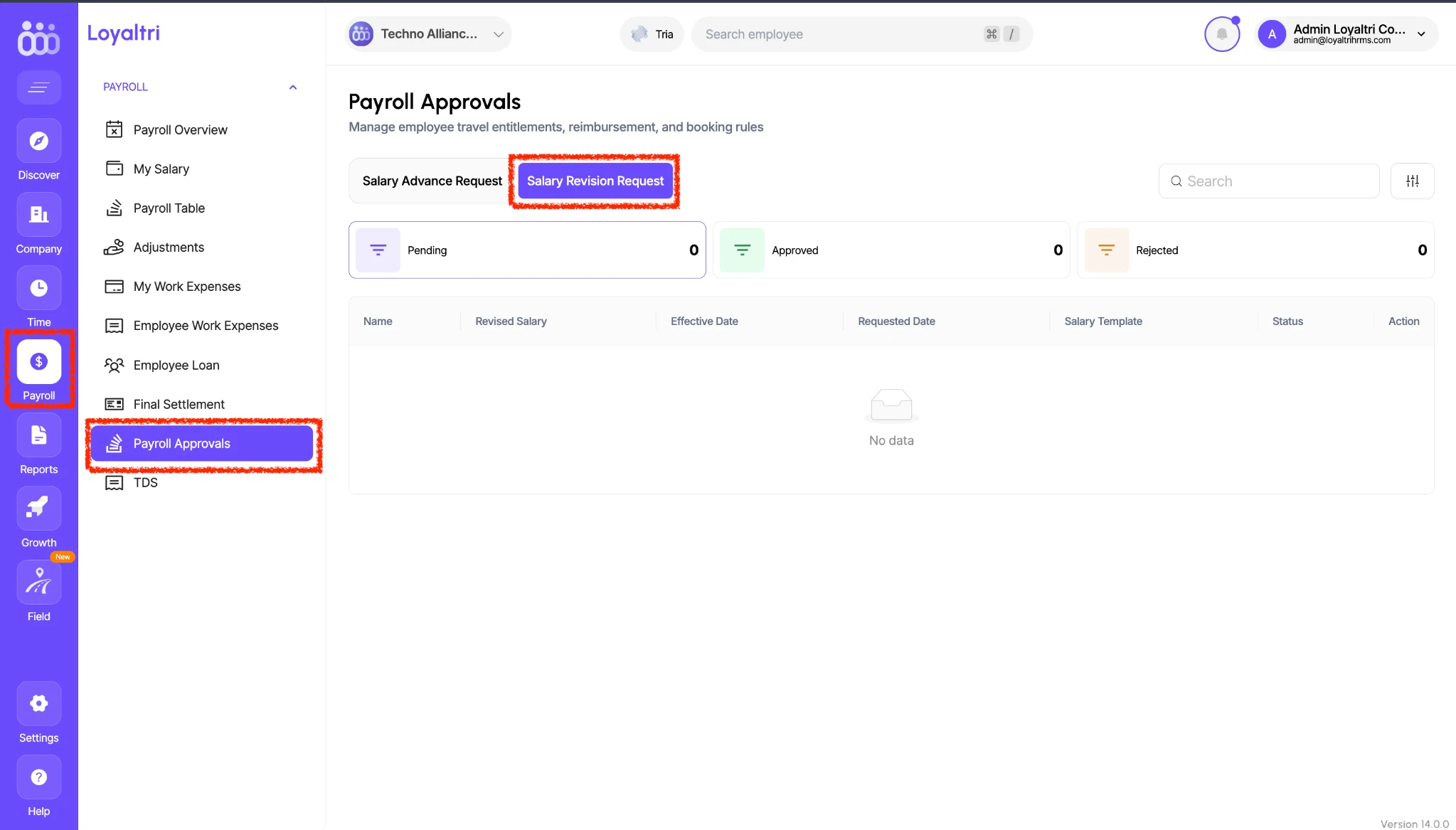
You can now configure multiple levels of approval for employee salary revisions in Loyaltri.
When a salary revision is submitted, it follows the configured approval flow so the designated approvers can review the change. This helps companies manage salary revisions through a structured process within the software.
Separate Approval Flow for Salary Revisions
A dedicated Salary Revision option is now available in the approval flow configuration. You can define the approvers and approval levels specifically for salary changes, according to your company’s requirements.
For example, a company can configure a salary revision to require review by the reporting manager, followed by HR and then the final authorised approver.
Dedicated Payroll Approvals Screen
Salary revision requests now have their own section under:
Payroll → Payroll Approvals → Salary Revision Request
From this screen, you can:
- View Pending, Approved, and Rejected requests.
- Review the employee’s name and revised salary.
- Check the effective date - the date the salary revision is intended to apply from.
- See the requested date, salary template, and request status.
- Review and take action on requests according to your assigned approval role.
This brings salary revision requests into one place, making them easier to review and track.
How was this update?
Pick the face that best matches your reaction