 Loyaltri
Employer Contributions and CTC in Payslips and Employee Profiles
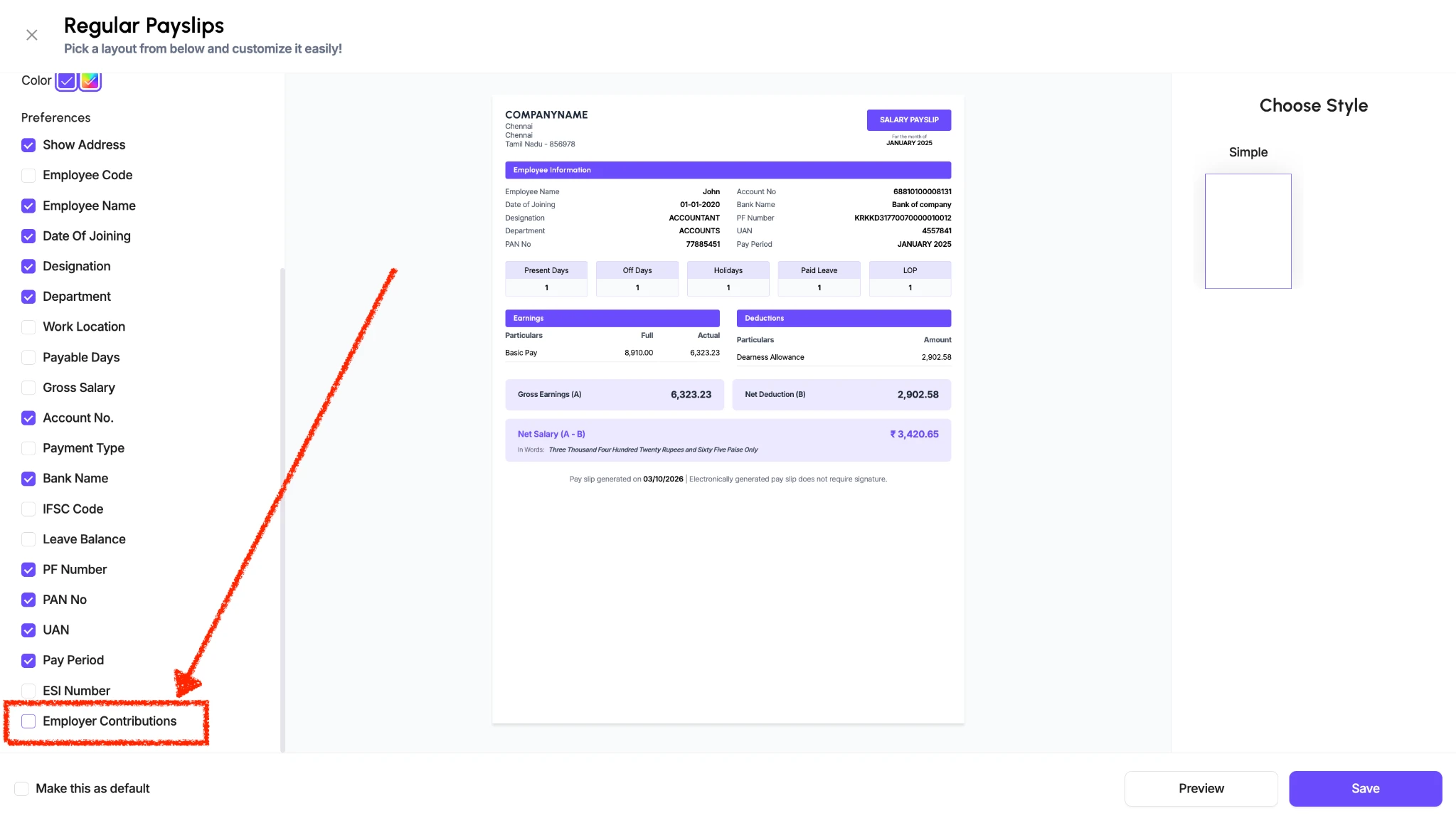
You can now include employer contributions and employee CTC in the payslip, giving employees a clearer view of their compensation.
Employer contributions are amounts the company contributes towards an employee’s benefits, in addition to their salary.
CTC (Cost to Company) represents the employee’s total compensation cost to the company, including the salary and applicable employer contributions. It helps employees understand the company’s contribution beyond the amount they receive as take-home pay.
How to Enable This in the Payslip
1. Go to Settings → Templates → Payslip Template.
2. Select the payslip template you want to update.
3. Tick Employer Contributions under Preferences.
4. Click Save.
Once enabled, the payslip using this template will display the employer contribution details and employee CTC.
View CTC in the Employee Profile
Employee CTC is also available in the Payroll section of the employee’s profile. HR can review this information directly within Loyaltri when checking an employee’s payroll details.
How was this update?
Pick the face that best matches your reaction