 Loyaltri
Help & Support – Step-by-Step Walkthroughs in Loyaltri
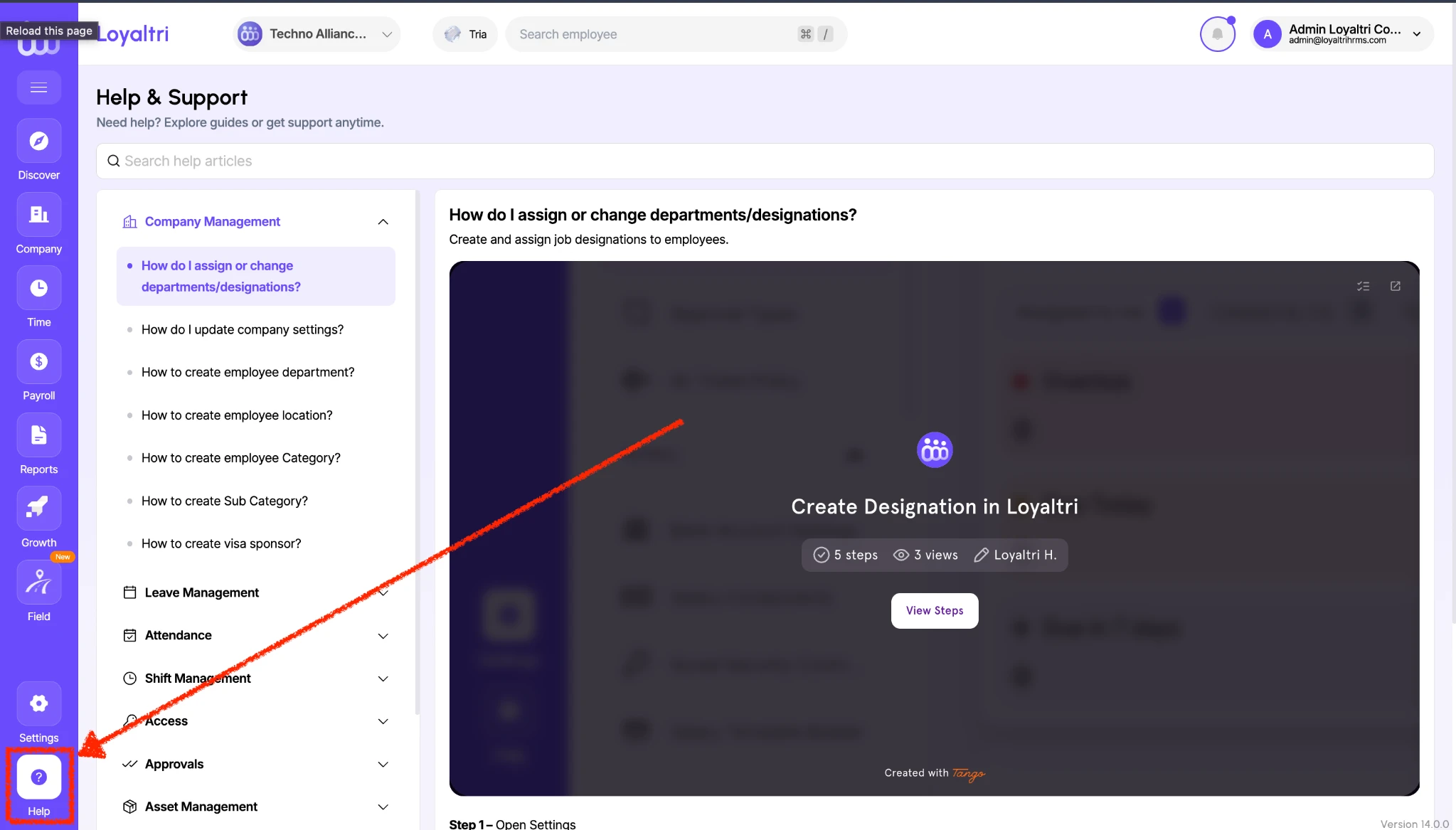
You can now access step-by-step walkthroughs directly within Loyaltri through the Help & Support section.
Whether you are learning the software for the first time or need a reminder while completing a task, these guides explain where to go, what to click, and how to proceed.
Find the Help You Need
- Search for an action: Use Search help articles to find guidance for the task you want to complete.
- Browse by module: Explore guides grouped under sections such as Company Management, Leave Management, Attendance, Shift Management, Access, Approvals, and Asset Management.
- Follow visual instructions: Open a guide and click View Steps to follow the walkthrough, with screenshots and instructions explaining each step.
For example, the Company Management section includes guidance on creating departments, locations, categories, and visa sponsors, as well as assigning or changing employee departments and designations.
This makes it easier to learn Loyaltri, complete tasks independently, and revisit instructions whenever needed.
How to Access
1. Click Help in the left navigation menu.
2. Search for your task or browse the relevant module.
3. Select the help article.
4. Click View Steps and follow the instructions.
How was this update?
Pick the face that best matches your reaction