 Loyaltri
Improved Leave Request Design with Loyaltri AI Insight
What’s New
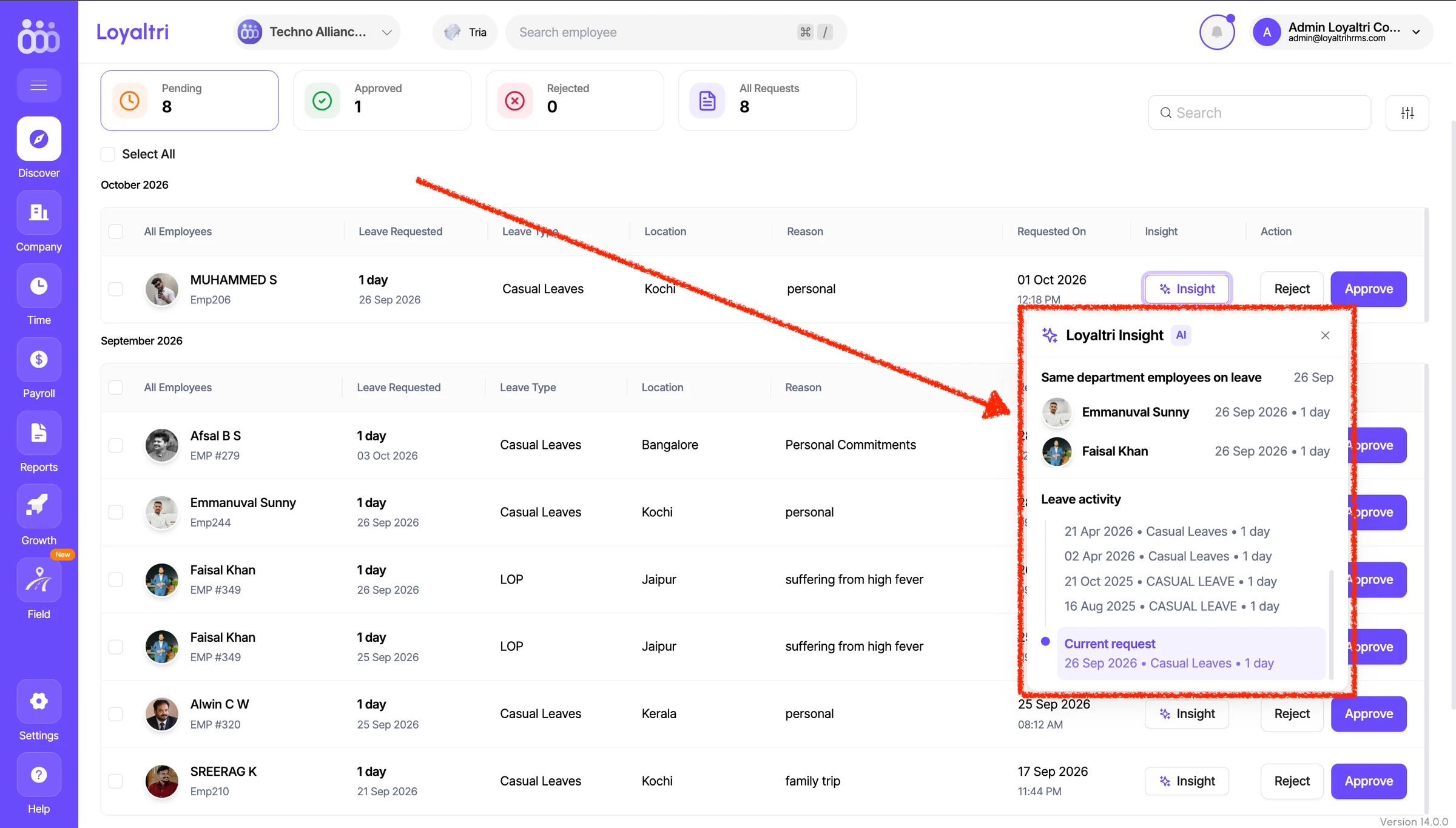
The Employee Leave request screen has been redesigned to make reviewing and managing leave requests easier. The updated layout clearly presents the employee’s details, requested leave dates, duration, leave type, and reason, along with the options to approve or reject the request.
We’ve also introduced Loyaltri Insight, which brings relevant leave information together so managers can review a request with a clearer understanding of both the employee’s leave activity and their department’s availability.
Click Insight beside a leave request to view:
- Previous leaves: Review the employee’s leave records before the dates of the current request, including the leave dates, types, and durations.
- Current request: See the leave request being reviewed, highlighted in the timeline for easy reference.
- Upcoming leaves: Check the employee’s leave records after the dates of the current request.
- Department leave activity: See which other employees in the same department have taken leave, helping you understand the team’s leave activity and check for overlapping dates.
This gives managers useful information in one place, reducing the need to open separate employee records or switch between screens before making a decision.
How was this update?
Pick the face that best matches your reaction