 Loyaltri
Sandwich Policy Management – Automated Identification & Review
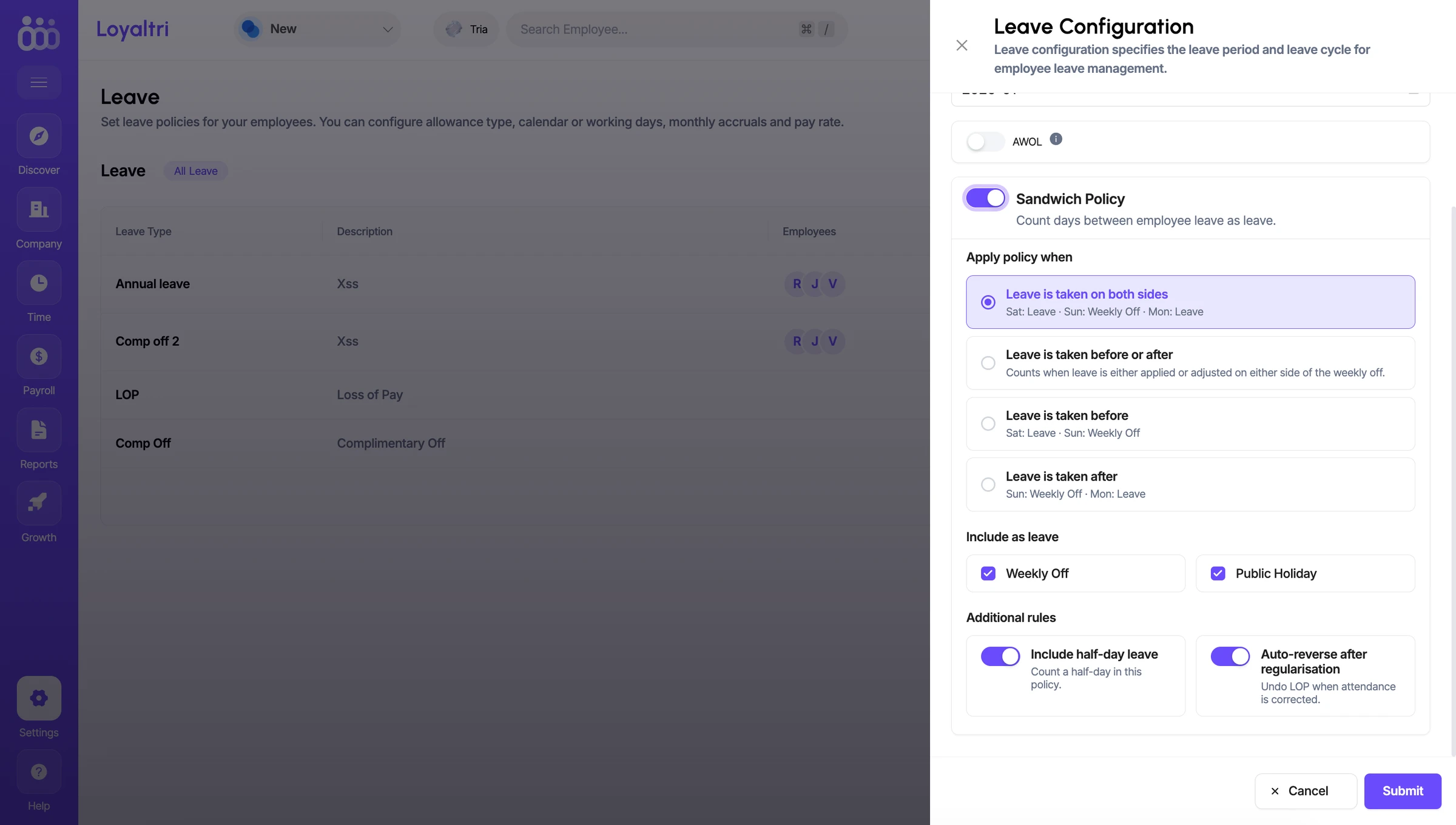
We have introduced Sandwich Policy Management in Loyaltri to help organizations automate and manage leave scenarios where a Weekly Off or Public Holiday falls before, after, or between employee leave days.
The Sandwich Policy can be enabled from Settings → Leave → Leave Configuration (settings icon). Once enabled, HR can configure exactly when the policy should apply based on the organization’s leave rules.
What’s New
Flexible Sandwich Policy Rules
- Organizations can decide when the Sandwich Policy should be triggered:
Leave is taken on both side
- Example: Leave → Weekly Off → Leave
Leave is taken before or after
- Apply the policy when leave exists on either side of the Weekly Off/Public Holiday.
Leave is taken before
- Example: Leave → Weekly Off
Leave is taken after
- Example: Weekly Off → Leave
Choose Which Days to Include
Organizations can configure whether the Sandwich Policy should consider:
- Weekly Off
- Public Holiday
This allows the policy to match the company's actual leave rules.
Half-Day Leave Support
The Include Half-Day Leave option allows half-day leave requests to also be considered while identifying Sandwich Policy cases.
Auto-Reverse After Regularisation
If attendance is later corrected through regularisation, the system can automatically reverse the related Sandwich Policy impact, helping avoid unnecessary manual corrections.
Automatic Sandwich Policy Identification
Once the feature is enabled, a new Sandwich Policy tab will be available in the Employee Leave screen.
Loyaltri will automatically identify employees and leave transactions that meet the configured Sandwich Policy conditions and list those cases in this section.
HR can then review the identified cases and take the required decision directly from the Sandwich Policy screen.
How was this update?
Pick the face that best matches your reaction