 Loyaltri
All releases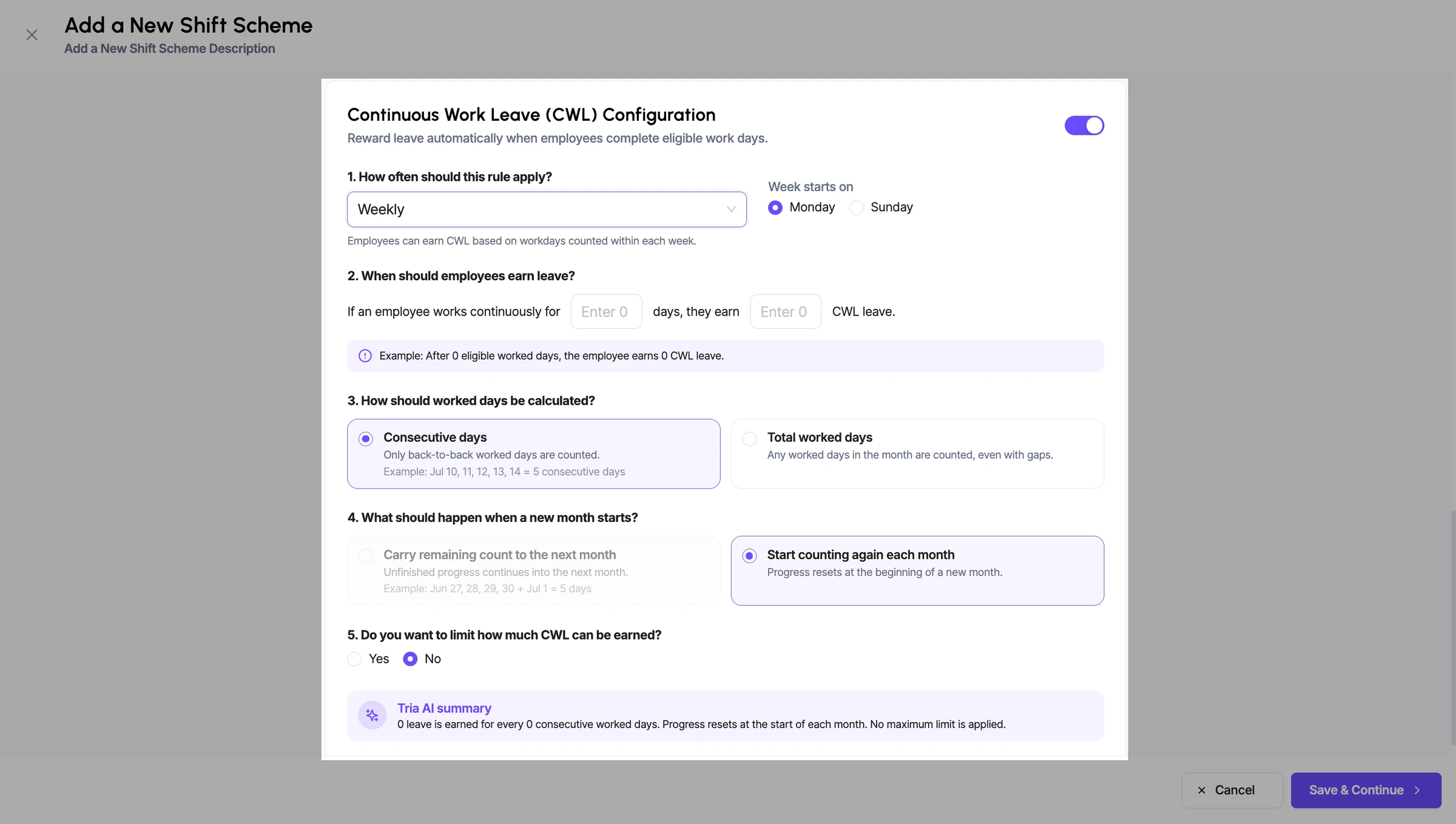
CWL Earning Limit
Improvement
Continuous Work Leave (CWL) – Enhanced Configuration
- We have enhanced the Continuous Work Leave (CWL) configuration to give organizations more flexibility in automatically rewarding leave based on the number of days employees actually work.
CWL can now be configured on either a Weekly or Monthly basis, with additional options to control how worked days are counted, when the count resets, and whether there should be a maximum earning limit.
What’s New
Weekly or Monthly Accrual
- Weekly: CWL eligibility is calculated based on the employee’s worked days within each week.
- Monthly: CWL eligibility is calculated based on the employee’s total worked days within the month.
Configurable Week Start Day
- For weekly CWL, you can define when the week starts, such as Monday or Sunday.
- The employee’s eligibility will be calculated within the configured weekly cycle.
Define Work Days & CWL Entitlement
- Configure how many eligible worked days an employee must complete.
- Define how much CWL leave should be earned after completing those days.
- Example: Work 5 eligible days → Earn 1 CWL.
Choose How Worked Days Are Counted - Consecutive Days: Only continuous, back-to-back worked days will be considered.
- Total Worked Days: All eligible worked days within the applicable period can be counted, even if there are gaps between them.
Control the Reset / Carry-Forward of the Count - Organizations can choose whether unfinished worked-day progress should be carried forward to the next period or whether the count should start again from zero when the new period begins.
CWL Earning Limit
- You can decide whether employees should have a maximum CWL accrual limit.
- If no limit is configured, employees can continue earning CWL based on the defined eligibility rule.
How was this update?
Pick the face that best matches your reaction
Completely anonymous